AI UX Tools for User Testing
Userlytics’ AI UX tools for user research turn hours of session footage into searchable, citable, shareable insights, all grounded in actual study data. Seven AI UX tools, one research workflow, with the researcher in full control. This is the best of AI for user research, keeping UX researchers in total control.
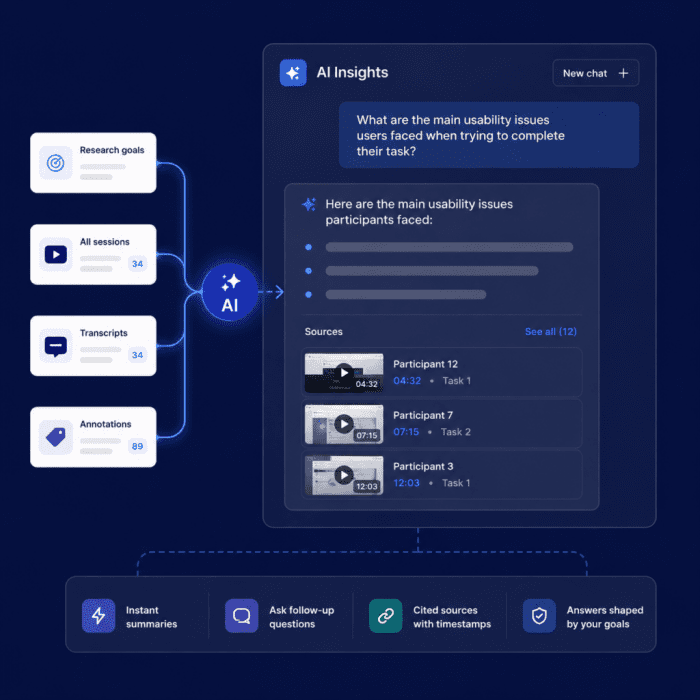
AI Insights
A conversational workspace for your research, with every AI-generated insight traced back to session data.
AI Insights offers an initial summary of your study results, drawing from your goals, every session, transcript, and annotation, the AI UX research tool that shows you exactly where every answer came from. Interact with the AI assistant asking follow-up questions and receive themed answers in seconds, each one citing the exact timestamps and sessions the AI used to build it. Every answer is shaped by the research goals you set in Study Builder so you can confidently gather and share insights, in record speed.

AI Annotations
Automated annotations for every user research session, with every key moment flagged, timestamped, and ready to share.
AI Annotations surfaces key moments, sentiment patterns, and usability friction the moment your transcripts are ready, and packages them into shareable clips and highlight reels. Every AI-generated annotation is flagged so you can distinguish automated findings from manual annotations at a glance. You can edit, refine, delete, or add your own annotations alongside them, with the AI handling the first pass while you decide what stays. Hours of manual work, now done in seconds.
AI Chart Summaries
Get an instant interpretation of your metrics results with a click! No more manual cross-referencing or second-guessing averages.
Every summary is tailored to the activity type, so a Write-In response, a Rating scale, and an NPS score each get an analysis that fits what they actually measure, surfacing top preferences, hidden polarization, and patterns buried in the data. This is hours of manual analysis, now done in seconds.

Auto-generated Transcriptions
Every session, transcribed and searchable.
Userlytics auto-transcribes every session in up to 36 languages, with speakers identified so you can tell the moderator from the participant at a glance. Transcripts are searchable across the entire study and serve as the foundation that AI Annotations and AI Insights build on.
AI Transcript Translations
Remove the language barrier from global research with AI Transcript Translations.
No external translators, no copy-paste workarounds! Now you can translate transcriptions by choosing from the most common languages used in global research, and the full transcript updates in seconds, synced to the video playback. Every team member viewing that session sees the translation instantly. Need to verify an exact quote? Reset to the original transcript in one click, anytime. Global research, now without the language gap.
Sentiment Analysis
Sentiment analysis for user research, turning how users felt into timestamped data your team can act on.
Sentiment Analysis reads participant tone across every session and visualizes it as a moment-by-moment timeline. See where engagement peaked, where confusion took over, and where frustration set in, all without reviewing the full session.
Video Analysis
Session video analysis for user research, with activities, annotations, and sentiment mapped to one shared timeline.
Video Analysis brings annotations, activities, sentiment, and transcripts into a single, context-aware timeline. Hover any marker to preview a moment, jump to it, or share the full session with stakeholders through a public link.
AI you can audit, line by line

Transparent AI Insights
Every AI-generated annotation is clearly labeled, and every insight includes source-backed references so your team can verify findings line by line.
Built for Data Privacy
Userlytics follows GDPR, CCPA, and ICO standards, with optional EU hosting and OpenAI protections that prevent your research data from being used for model training.
Secure Research at Scale
Each study is isolated and processed independently, ensuring no data leaks across sessions, customers, or accounts while maintaining enterprise-grade security and compliance.
Frequently Asked Questions About Userlytics’ AI UX Tools
GET STARTED
Ready to run the full AI stack on your next study?
See how much faster you can move from raw sessions to stakeholder-ready findings.