



Skip to content

How can I edit the screener of my study if it’s already launched?

Published:

You are not receiving many results for your study? Please consider editing your screener to open the criteria and increase the probability of recruitment. 

If you have already launched your study please follow the below instructions to edit your screener. 

  1.  Please access your client Dashboard. 
  2. Identify the study you want to edit.
  3. Click on the options on the right of your study. 
  4. Select “Complete Study”. That will close the study and return all the credits that were unused
  5. Then click on clone study and you will be able to edit the screener or activities. 
  6. Once it’s ready you can relaunch it.  

Please contact us at operations@userlytics.com if you have any questions or concerns. 
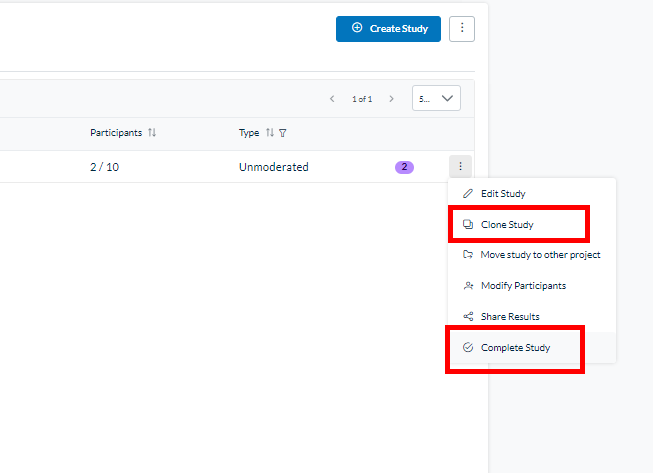
Userlytics Platform - editing screener of an already launched study.

Didn’t find what you were searching for?

Related posts:

Audiences and Filters
May 25, 2026

How to Use BYOU Panel Management to Invite and Manage Your Own Participants

Learn how to use BYOU Panel Management to import, validate, and send email invitations to your own study participants.
Audiences and Filters
May 12, 2026

How to Prepare Your CSV Contact File for BYOU Studies

Learn how to prepare your CSV contact file for BYOU studies. Follow our formatting rules and system limits for a seamless participant import.
Audiences and Filters
February 9, 2026

How to Use the New Study Builder with Quotas

Guide to the Userlytics study builder with quotas. Set up and launch your research project for multiple audiences with ease.
Audiences and Filters
October 6, 2025

How to Use Userlytics’ Tracking Functionality

Track Userlytics BYOU participants, offer incentives, and analyze data without them providing personal information.

Ready to Elevate Your UX Game?