





Skip to content

Client Recruitment: Invitation Widget

Published:

If you are supplying your own testers, you can create a customizable invitation widget and add it to your page or website. You can find this by clicking  “collect responses” on the left side panel of your dashboard within your desired study. 
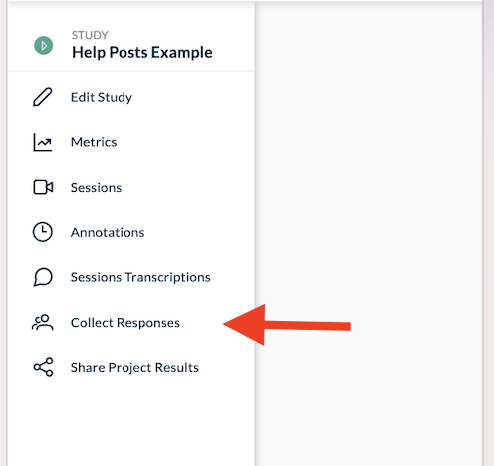
Userlytics platform - collect responses


Next, scroll down to “Embed In Page (Widget)”.  Here, you will be able to copy a small section of code (HTML & JS) and paste it into your site, to offer the visitors the possibility of completing your UX study. You can even customize the look and feel of the invitation widget to match your site’s aesthetic.
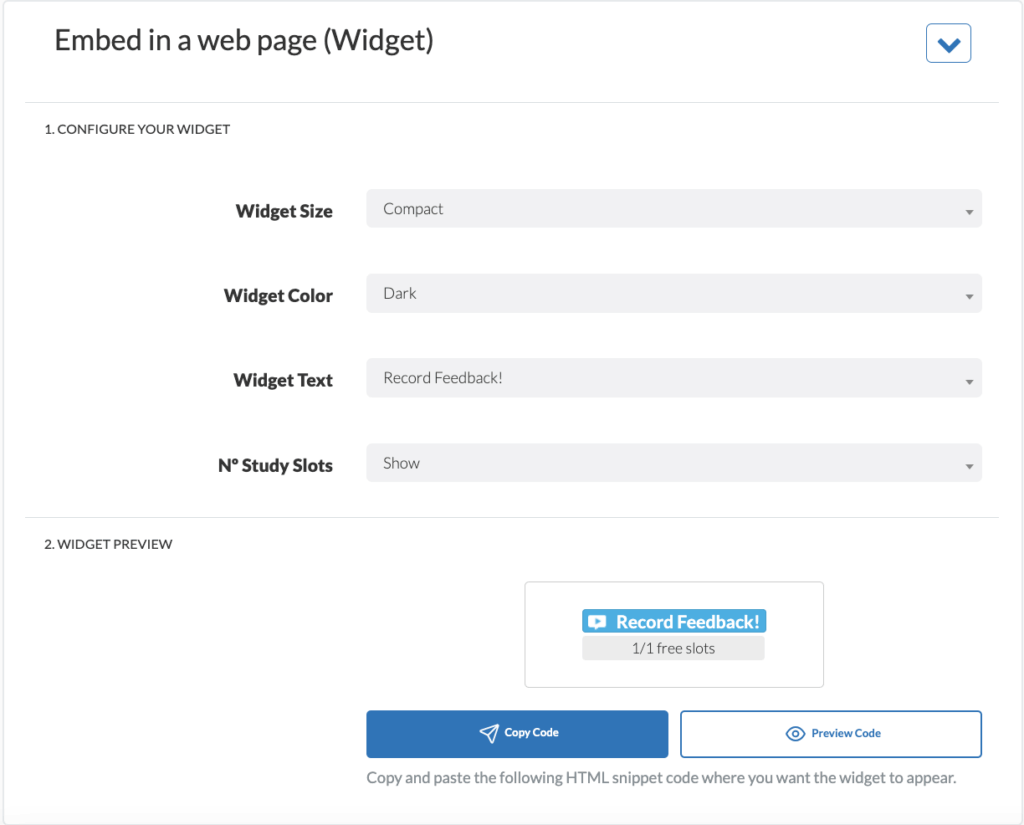

Userlytics platform - how to embed widget in a web page

Didn’t find what you were searching for?

Related posts:

Audiences and Filters
May 25, 2026

How to Use BYOU Panel Management to Invite and Manage Your Own Participants

Learn how to use BYOU Panel Management to import, validate, and send email invitations to your own study participants.
Audiences and Filters
May 12, 2026

How to Prepare Your CSV Contact File for BYOU Studies

Learn how to prepare your CSV contact file for BYOU studies. Follow our formatting rules and system limits for a seamless participant import.
Audiences and Filters
February 9, 2026

How to Use the New Study Builder with Quotas

Guide to the Userlytics study builder with quotas. Set up and launch your research project for multiple audiences with ease.
Audiences and Filters
October 6, 2025

How to Use Userlytics’ Tracking Functionality

Track Userlytics BYOU participants, offer incentives, and analyze data without them providing personal information.

Ready to Elevate Your UX Game?